How to Choose the Best Asset Tracking Software for UK Businesses (2026)
Learn how to choose the best asset tracking software for your business. Discover key features to look for, why spreadsheets fail, and how to improve a...
Read articleIT inventory management guide
IT inventory management gives a team a current view of the technology it owns, operates or keeps in stock. Depending on scope, that can include individually tracked laptops and devices, spare equipment held by quantity, installed software and cloud resources discovered through specialist tools.
The short answer
Separate physical custody, stock control and automated discovery before choosing software. AssetControl Cloud is a strong fit for individually tracked hardware, assignments, checkouts, returns, locations, QR or barcode records and service history. Use inventory, discovery, MDM, SAM or cloud-management products when quantity replenishment, technical state, software usage or virtual-resource inventory is the primary requirement.
How this guide was prepared: This guide is published by AssetControl Cloud. The product supports operational records for physical IT equipment; it is not represented as a network-discovery, endpoint-management, software-licensing, CMDB or cloud-resource inventory platform.
At a glance
Compare the approaches, then use the guidance below to decide what fits your operation.
| Decision factor | Inventory question answered | What to verify |
|---|---|---|
| Physical asset register | Which laptop, monitor, phone or device do we own, and what is its status? | Identifiers, serial numbers, ownership, lifecycle status, documents, history and imports. |
| Assignments and custody | Who has each device, where does it belong and when should it return? | Checkouts, returns, handovers, due dates, condition, signatures and overdue follow-up. |
| Stock and spares | How many unassigned devices, components or consumables are available? | Quantity movements, reorder points, reservations, purchasing, units and stock adjustments. |
| Hardware discovery or MDM | Which endpoints are connected, configured or reporting technical state? | Supported operating systems, agents, scan coverage, remote devices, freshness and management actions. |
| Software inventory and SAM | What is installed or subscribed to, and does usage match licence rights? | Discovery, SaaS connectors, normalisation, entitlements, reconciliation, usage and renewal data. |
| Cloud and configuration inventory | Which virtual resources and service relationships exist? | Provider coverage, APIs, ownership tags, configuration relationships, change frequency and cost data. |
Inventory is sometimes used to mean a list of every technology asset and sometimes to mean stock waiting in a storeroom. IT teams may also use the term for devices and software found automatically on a network. These views overlap, but they are maintained differently and support different decisions.
Write down the required scope: physical assets owned or leased, unassigned stock, accessories and consumables, software, SaaS subscriptions, network devices, data-centre equipment or cloud resources. Then identify the question each category must answer and the source that can keep it current.
Each individually managed device needs a stable asset identifier and recognisable description. Serial number, make, model, category, lifecycle status, home location and accountable owner provide a practical baseline. Purchase, warranty, review and disposal dates can support lifecycle decisions where the data has a clear owner.
Keep physical and technical state separate. The asset register may say a laptop is assigned to a named user and awaiting return; an endpoint-management tool may report its operating-system version and compliance state. Shared identifiers allow those records to be compared without pretending they are the same thing.
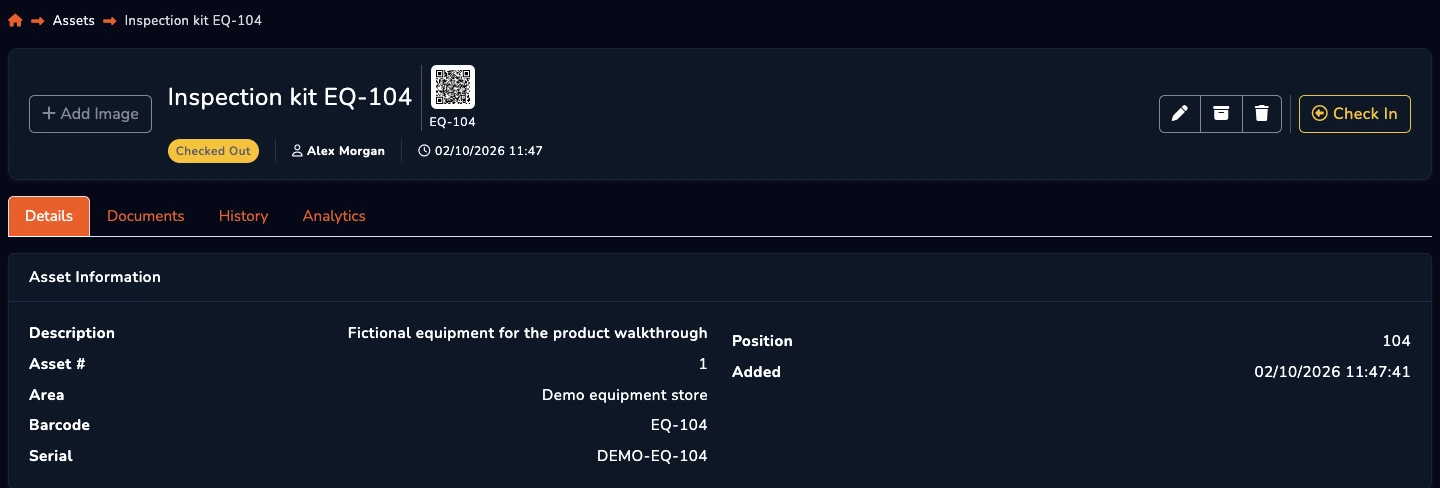
A register becomes inaccurate when updates are treated as a separate administrative exercise. Capture information when equipment is received, deployed, transferred, repaired, recovered, returned to stock and retired. Each event should have a named owner and a simple exception route.
Joiner, mover and leaver workflows are particularly important. New assignments should start with an accountable handover, role changes may move equipment or ownership, and departures should trigger recovery and access-removal work. Reconcile returned devices before marking them available for reuse.
QR codes and barcodes help staff select the correct physical record during assignments, returns and audits. A scan proves an interaction with a label at a point in time; it does not prove that an endpoint is connected, secure or running particular software.
Discovery and MDM tools provide technical evidence from supported devices, but they may miss equipment that is powered off, stored, disconnected or outside management scope. Periodic physical audits and reconciliation between sources expose those gaps. Define how discrepancies are investigated instead of automatically allowing one feed to overwrite accountable custody data.
Test representative tasks: receive devices, assign one, transfer another, count spare stock, recover equipment from a leaver, investigate a discovery mismatch and retire an item. Evaluate data entry, imports, integrations, permissions, audit history, reporting and exports against the teams that will own each step.
AssetControl Cloud fits physical device and equipment accountability across people and locations. Pair it with specialist tooling when technical discovery, endpoint enforcement, software licence reconciliation, stock replenishment or cloud-resource relationships are required. A clear system of record for each data type is more dependable than forcing every inventory view into one product.
A few useful answers
Clear answers to help you choose the right approach for your team.
From the blog